
Local teams serve Vancouver, Edmonton and Calgary. Call (604) 813-7881 for a free consult with Tony. No pressure, no jargon.
Is your clinic outgrowing its IT setup?
Is your clinic outgrowing its IT setup?
Many clinics start with a setup that was right on day one. Growth changes what a clinic needs.
What does outgrowing your IT look like?
We often meet clinics at about $1.5 to $2.5 million in yearly revenue that have outgrown a first setup. It was often built by a one-off or part-time helper, and often without Hyper-V. Nobody did anything wrong. It was built for a smaller clinic. That is our observation, not a statistic.
Holding a server quote? See why a second look helps.
Signs to look for
- No Hyper-V. A server failure stops everything.
- Upgrades feel risky. Nobody is sure there is a way back.
- Backups never test restored. You learn they fail on the bad day.
- One person holds everything. The passwords and know-how sit in one head.
The foundation we build
- Hyper-V. The whole server is backed up and can be restored on other hardware. See Hyper-V for dental clinics.
- RAID 10 recommended. Fast disks that keep working if a drive fails. RAID 6 is the budget option, with more usable space per dollar.
- Gigabit, wired. Steady speed to every chair. With a CBCT, consider 10GbE.
- Right-sized firewall. A Cisco Meraki MX firewall with Advanced Security, matched to your internet speed (1 Gbps with protection on), so it’s never throttled. Fast traffic between networks, such as 10GbE for a CBCT, goes through the Layer 3 switch, not the firewall.
- Two or more virtual servers. One for sign in, one dedicated app server, never apps on the domain controller. Windows Server Standard or Datacenter licensing covers them.
- Separate networks (VLANs). Guests, phones and clinical devices each get their own lane, with rules for what may connect.
- Secure by default. Multi-factor sign in, remote desktop never exposed to the internet, weekly patching and endpoint protection with 24/7 monitoring.
- Growth headroom. Room for more operatories, users and images.
- Tested 3-2-1 backups. Three copies, two kinds of storage, one offsite. RAID isn’t a backup. Restores are proven before the bad day. We also ask how long you can be down and how much data you can lose. See what happens when something fails.
- Planned changes. A plan, a tested backup, a short lived checkpoint and a planned way back.
- One team for the whole stack. Server, network, backups, security and help desk.
Want the short version? See what every clinic should have. The best time to build this is day one. If you’re past day one, it’s not too late.
2 virtual servers
One for sign in, one dedicated app server. Never apps on the domain controller.
RAID 10 storage
Keeps working if a drive fails.
SSD drives
Faster loading for charts and images.
Cisco Meraki MX firewall
With Advanced Security on and matched to your internet speed, 1 Gbps with protection on, so it’s never throttled.
PoE switches
One cable powers phones and Wi-Fi, for a tidy network.
VLANs and Layer 3
Keeps patient Wi-Fi apart from imaging and the server.
Starting small? Start right.
A simple setup now and a better one later is an understandable plan. Moving later has a cost that’s easy to miss.
- It costs time, not only money. A later move means planning, migration, testing and a switch over on a system you rely on every day.
- The front desk feels a rushed change. Schedules, charts, imaging and billing all run on the same system.
- Hyper-V makes upgrades gentler. The old and new systems run beside each other while the new one is tested. Then we switch over, with a way back.
Starting right doesn’t mean starting big. It means a foundation that can grow with you. See Hyper-V for dental clinics and our support plans.
Why a second opinion helps
Before you sign a server quote, get a second look.
Peer groups are friendly and well meaning, and dentists often turn to them for IT help. Here are three posts from one, with names removed.
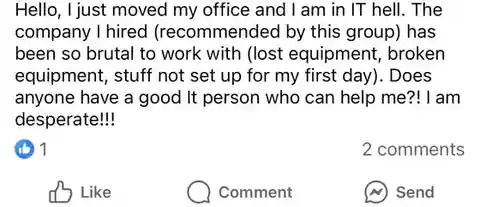
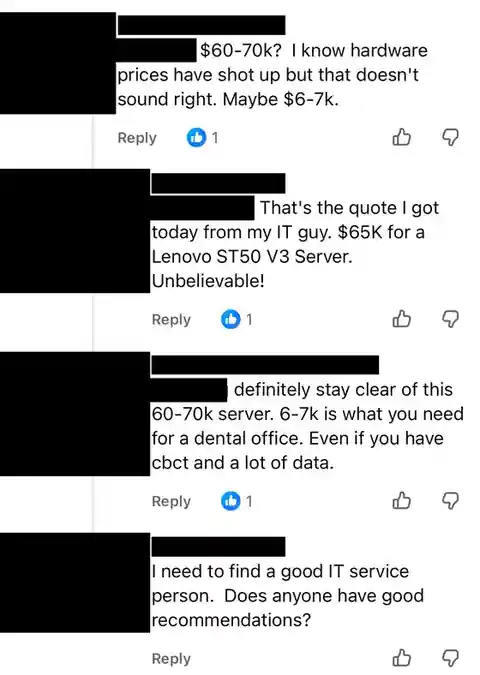
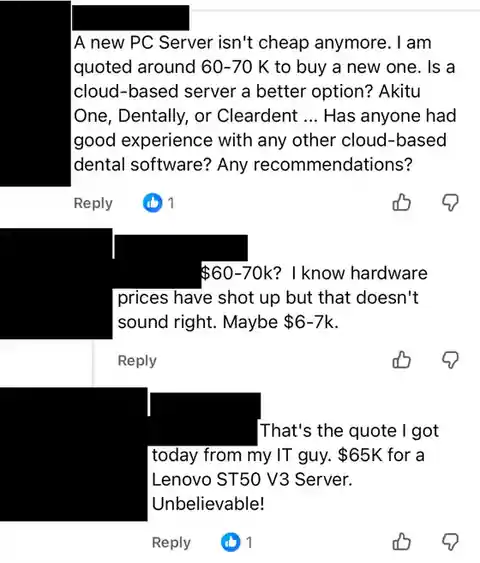
- A low price deserves a closer look. It often means entry level equipment not built for a clinic’s imaging, growth and uptime. A proper build costs more.
- A high quote deserves a look too. Check any number against your real needs: Hyper-V, RAID 10, growth and imaging.
- Equipment can affect your insurance. Mismatched equipment raises the chance of failure and cyber risk, which may matter to your insurer. Worth checking with them. This isn’t legal advice, and we can’t promise any outcome.
None of this is about anyone being careless. A quote is only one piece of the picture. A qualified, independent IT professional can give you a clear view before you commit. We’re glad to take a free second look at a quote or a plan.
Why it matters, in plain words
The tech behind this page, and why it’s there. See all the plain guides.
Hyper-V
Why one dead server shouldn’t stop the clinic
On Hyper-V, the server is a set of files that can come back on other hardware. Restores from local storage have taken less than 2 hours.
RAID 10
Why two healthy drives still aren’t a backup
RAID 10 keeps the server running when a drive dies. It also copies a mistake or ransomware to every drive instantly.
Business firewall
Why the internet company’s router isn’t a firewall
It connects you. A business firewall inspects traffic, stops known attacks and keeps guests off the clinic’s network.
Outgrown setup questions
Was our first setup a mistake?
No. It was right at the time. Growth changed the needs.
Can we fix it without starting over?
Often, yes. We take a tested backup first, then move to Hyper-V in planned steps around clinic hours.